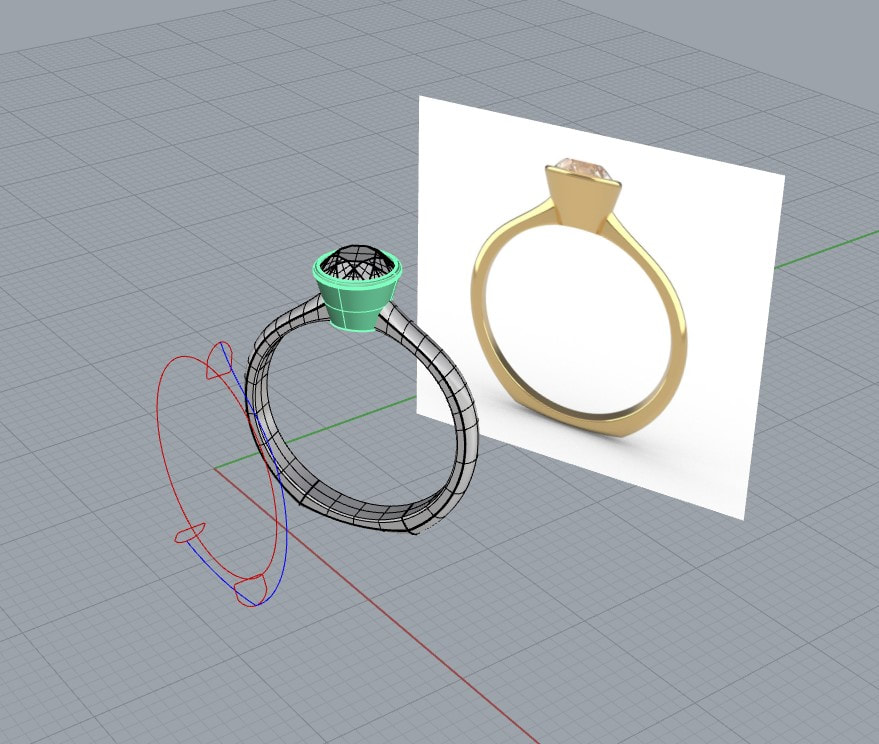
Diamond Ring CAD Design Workflow: From Concept to Manufacturing
5 March 2026by
Deepak
| No comments yet
Introduction to Diamond Ring CAD Design
Diamond jewellery design has evolved significantly over the last decade. Traditional hand sketching and manual wax carving are now complemented by powerful CAD software that allows designers to create extremely precise jewellery models. This technology enables jewellery designers to visualize designs, test structural strength, simulate stone settings, and generate manufacturing-ready models before any physical production begins.
A professional CAD workflow is essential because jewellery is a precision product. Even a tiny mistake in diamond placement, metal thickness, or stone seat design can cause problems during casting or stone setting. CAD design eliminates many of these risks by allowing designers to test and refine their models digitally.
Today most jewellery manufacturers rely heavily on CAD files for 3D printing, casting preparation, and production planning. This makes CAD design one of the most important steps in modern jewellery manufacturing.
If you want to explore ready CAD jewellery designs you can visit
Understanding the Complete Jewellery CAD Workflow:
The CAD workflow for diamond ring design typically follows a structured process. Professional jewellery designers do not jump directly into modeling. Instead they carefully plan the design through multiple stages to ensure both beauty and manufacturability.
The typical workflow includes concept development, stone layout planning, CAD modeling, structural verification, rendering visualization, and finally manufacturing preparation. Each stage plays a crucial role in ensuring the final jewellery piece is both visually stunning and technically correct.
Skipping steps in this workflow often leads to expensive mistakes later during production.
Concept Development and Design Planning
The first stage in any jewellery design process is concept creation. Even though CAD software allows direct modeling, professional designers usually start with hand sketches or digital sketches.
Sketching allows designers to explore proportions, shapes, and creative ideas quickly before committing to technical modeling. It also helps visualize the overall structure of the ring including the stone arrangement and metal flow.
During the concept stage designers decide key design elements such as ring style, stone type, number of diamonds, setting type, and overall aesthetic theme. Engagement rings, solitaire rings, halo rings, and pavé designs all require different structural considerations.
Careful planning during this stage helps avoid unnecessary changes during the CAD modeling phase.
Diamond Selection and Stone Layout Planning
Before beginning CAD modeling, designers must determine the exact diamond sizes and arrangement. Diamonds come in many shapes including round, princess, oval, emerald, and pear. Each shape requires different setting methods and structural support.
Stone layout planning ensures that diamonds fit perfectly within the design while maintaining proper spacing between stones. Incorrect spacing can cause major problems during stone setting.
Designers must calculate the diamond diameter, girdle thickness, and pavilion depth to ensure that the stone seat is placed correctly in the CAD model. These calculations also affect how light interacts with the diamond in both real life and rendering simulations.
Professional designers often create parametric stone layouts that automatically adjust when stone sizes change. This allows the design to remain balanced even when clients request modifications.
Creating the Base Ring Structure in CAD
Once the concept and stone layout are finalized, designers begin building the base ring structure in CAD software. The ring shank is usually created first because it forms the structural foundation of the entire design.
The shank must have the correct thickness and curvature to ensure durability and comfort. Designers must consider how the ring will be worn daily and ensure that the band is strong enough to withstand regular use.
Professional CAD designers maintain minimum metal thickness guidelines to prevent structural weakness. The ring should also maintain smooth transitions between different surfaces to ensure comfortable wear and easy polishing.
At this stage designers focus primarily on structural geometry rather than fine details.
Designing the Diamond Setting Structure
The diamond setting is one of the most technically demanding parts of jewellery CAD design. The setting must securely hold the stone while also maximizing light reflection to enhance brilliance.
Different types of diamond settings require different modeling approaches. Prong settings require precise prong placement around the stone girdle. Bezel settings require a metal rim that surrounds the diamond. Pavé settings involve placing multiple small diamonds closely together.
Designers must carefully create the stone seat where the diamond will rest. This seat must match the exact angle and position of the diamond’s pavilion. If the seat is too deep or too shallow, the diamond will not sit correctly during setting.
Accurate diamond seating ensures that setters can place the stone quickly and securely during manufacturing.
Adding Fine Details and Decorative Elements
After the structural elements are completed, designers begin adding decorative features to enhance the design. These details may include galleries, filigree patterns, engraving, or accent stones.
Decorative elements should always be balanced with manufacturing feasibility. Extremely tiny details may disappear during casting or polishing. Designers must therefore ensure that fine elements maintain enough thickness to survive the production process.
Good CAD design combines artistic creativity with practical manufacturing considerations.
Verifying Structural Integrity
Before finalizing the CAD model, designers perform structural checks to ensure the design can be manufactured successfully. These checks involve verifying metal thickness, stone seat alignment, and overall geometry accuracy.
CAD software allows designers to analyze weak areas of the model and reinforce them if necessary. For example, thin prongs may need to be thickened slightly to prevent breakage during polishing.
Designers also ensure that surfaces are properly joined and that there are no open edges or mesh errors. Clean geometry is essential for successful 3D printing and casting.
Creating Photorealistic Jewellery Rendering
Rendering plays a crucial role in modern jewellery marketing. High quality renders allow customers to visualize jewellery before it is manufactured.
Realistic jewellery rendering requires accurate material settings and lighting environments. Diamonds must have the correct refractive index and dispersion properties to simulate real diamond brilliance.
Lighting environments such as studio HDR maps are used to produce realistic reflections on metal surfaces. These reflections help emphasize the shape and polish of the jewellery.
Rendering is especially important for online jewellery stores where customers cannot physically inspect the product.
You can see examples of jewellery designs and CAD files here
Once the CAD design is finalized, the model must be prepared for manufacturing. This step ensures that the file can be used for 3D printing, casting, or CNC machining.
Designers convert the CAD model into formats such as STL or 3DM depending on the manufacturing process. Mesh resolution must be carefully adjusted to maintain detail without creating excessively large files.
Support structures may also be added for 3D printing to ensure the model prints correctly.
Proper file preparation prevents printing errors and ensures smooth production.
3D Printing and Casting Preparation
Many jewellery manufacturers use resin 3D printers to create wax models directly from CAD files. These printed models are then used in the lost wax casting process.
During casting preparation, the CAD model is attached to a sprue system that allows molten metal to flow into the mold cavity. Proper sprue placement is important to prevent air bubbles and incomplete casting.
After casting, the raw metal piece is cleaned, polished, and prepared for stone setting.
Stone Setting and Final Finishing
Once the metal piece is polished, professional stone setters carefully place the diamonds into the prepared seats. Prongs are bent or beads are raised to secure the stones in place.
After stone setting, the jewellery undergoes final finishing processes including polishing, cleaning, and quality inspection.
At this stage the digital CAD design becomes a finished physical jewellery piece ready for sale.
Why Professional CAD Design Matters
Professional CAD design dramatically improves the efficiency of jewellery manufacturing. It reduces design errors, minimizes material waste, and allows designers to experiment with creative concepts before committing to production.
High quality CAD models also make it easier for jewellery brands to showcase their designs through realistic renders and marketing visuals.
For jewellery businesses looking to streamline their design process, investing in professional CAD design services is essential.
If you are interested in jewellery CAD services you can visit
Diamond ring CAD design is a complex process that combines creativity, engineering, and manufacturing knowledge. A structured workflow ensures that jewellery designs are not only visually appealing but also technically feasible.
From concept sketching to stone layout planning, CAD modeling, rendering, and manufacturing preparation, each step plays an important role in creating high quality jewellery.
By following a professional CAD workflow, designers can avoid costly mistakes and produce jewellery pieces that meet both aesthetic and structural standards.
Modern CAD technology continues to push the boundaries of jewellery design, allowing designers to create more complex and innovative pieces than ever before.
For jewellery designers, manufacturers, and brands, mastering the CAD design workflow is one of the most important skills for success in today’s jewellery industry.
 | No comments yet